Give the number a visible outline
Use millimeter dimensions to compare diamond scale more clearly than carat alone.
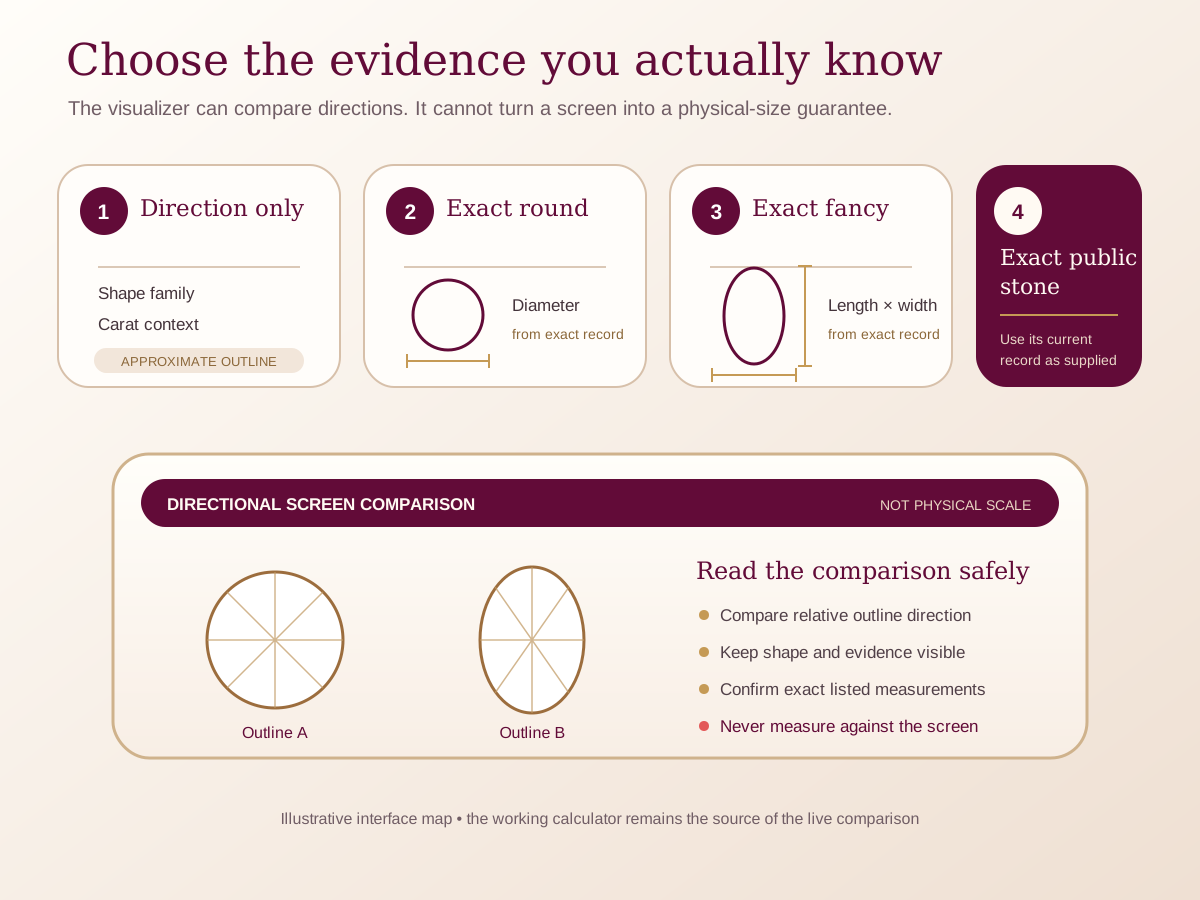
Choose a directional carat comparison or enter exact known dimensions, and keep the screen outline clearly labelled as not actual physical size.
Carat-to-millimeter visualizer
Compare a carat direction with dimensions you know.
Carat is weight, not a face-up measurement. Carat-based dimensions are broad visual approximations. You can also enter the exact length and width from a stone record.No price is estimated here. Compare the exact stone’s dimensions, proportions, and grading information when supplied before choosing.
Directional comparison · not physical screen scale
Explore the relationship, then replace estimates with facts
Can a carat-to-millimeter visualizer show the exact size of a diamond?
Only when you enter the exact measured dimensions can the tool carry exact length and width as your own input. A carat-based view is a directional comparison built on stated assumptions; it cannot predict the measurements of every diamond at that weight.
The on-screen outline is not a physical ruler. Use it to compare relationships between shapes or inputs, then check the exact stone record before carrying a size direction into Atelier or asking Leyloon to review it.
- Shape
- The outline whose proportions you want to explore
- Input type
- Carat-based direction or exact measured dimensions
- Confidence
- Clearly labelled estimate versus customer-entered fact
- Next question
- What the comparison should help you decide in the ring
Choose the mode that matches your evidence
Do not let a directional estimate look exact
The safest mode is the one that honestly describes what you know right now.
| Mode | Useful for | Carry forward | Do not claim |
|---|---|---|---|
| Carat direction | Early exploration when no exact stone has been selected. | Shape, entered weight, and an explicit estimate note. | Exact millimeter dimensions. |
| Exact round measurement | A known diameter or diameter range from a real record. | The customer-entered measurement and its source. | That the screen outline is physically calibrated. |
| Exact fancy-shape axes | Known length and width for an oval, pear, emerald, or other non-round outline. | Both axes, orientation, and the exact shape. | Depth, proportions, or quality from two numbers. |
| Exact stone record | Designing around one identified stone. | Keep the stone reference and verified report details privately with this visit. | Availability, price, or setting feasibility before review. |
No conversion table can replace the exact stone's measurements. Screen density, zoom, and device settings also prevent an on-screen outline from being actual size.
Two ways the evidence can change the choice
Keep the reliable clue. Leave the uncertain part open.
Illustrative planning example—not customer proof
You are exploring before choosing a stone
You know the shape and broad carat direction but have no exact measurements.
- Keep in the comparison
- Keep the result labelled as a directional estimate.
- Leave open
- Replace it with exact dimensions when a real stone is selected.
Illustrative planning example—not customer proof
You have a grading report
The report provides length, width, and depth for one identified stone.
- Keep in the comparison
- Enter the exact face-up dimensions and preserve the source privately.
- Leave open
- Use the actual record—not the diagram—to review depth, proportions, identity, and setting fit.
The questions people ask before choosing
Clear answers, with the limits kept visible
Can I place my ring on the screen to compare?
No. The display is not calibrated to physical scale, and device zoom or pixel density can change what you see.
Why does the same carat show different shapes?
Shape and assumed proportions distribute weight differently. Treat the result as a relationship, not a promise about an exact stone.
Can the tool grade a diamond?
No. It does not determine identity, cut, color, clarity, or report validity.
Will the size I choose automatically become my final ring?
No. It is an editable direction. Leyloon still reviews the exact stone, setting, fit, material, and quote request.
Five details to check
Before this diamond direction enters Atelier
Choose the exact shape before entering a comparison.
Select estimate or exact-dimensions mode honestly.
Enter only measurements you can trace to a real source.
Keep the not-actual-size boundary visible.
Replace estimates with the exact stone record before final review.
What happens after this page
Evidence becomes a reviewed jewelry direction
An educational comparison is not an exact stone, appraisal, price, design approval, or purchase. These steps keep the customer’s choice separate from Leyloon’s review.
- Choose the shape
Select the outline you want to compare.
- Name the evidence
Choose a carat-based direction or exact measured dimensions.
- Explore the relationship
Compare only what the selected mode can truthfully show.
- Keep measurements private
Keep raw dimensions and source notes private while you compare.
- Continue with what you know
Keep the shape and any exact measurements you chose, then leave the remaining details open for review.
Authoritative and first-party sources
Check the evidence behind the guidance
Laboratory and consumer-protection sources support technical boundaries. Leyloon sources explain Leyloon’s own design and reviewed quote path.
- GIA · diamond shape, weight, and perceived sizeIndependent guidance explaining why carat weight, dimensions, proportions, shape, and setting context should not be treated as the same thing.Accessed August 26, 2026 · Open source ↗
- IGI · carat weight educationOfficial IGI education distinguishing gemstone weight from physical spread and explaining why equal weights can look different face-up.Accessed August 26, 2026 · Open source ↗
- FTC · truthful diamond and gemstone descriptionsU.S. business guidance on accurate weight descriptions and clear disclosure of laboratory-grown versus mined origin.Accessed August 26, 2026 · Open source ↗
A clear answer for this stone choice
Compare a labeled diamond outline by shape, approximate carat context, or exact length and width.
This tool compares diamond face-up outlines from shape and millimeter dimensions. Carat context can suggest a starting estimate, but only an exact stone's length and width can represent that stone's face-up outline.
The drawing is directional and never promises physical screen scale. When you continue, the shape, carat context, measurements, and any selected catalog stone stay with your design; personal notes and uploads stay private.
Who this can help
See whether this feels like your decision
- A shopper translating a grading report into a visible outline
- A buyer comparing two shapes at similar carat weight
- A custom-ring client with exact private length and width
Ways it may become part of your story
Meaning does not have to follow one occasion
- Engagement-ring scale choice
- Diamond upgrade
- Exact-stone setting brief
Birthstone contextDiamond is April's birthstone; the tool remains a measurement aid rather than a birthstone recommendation.
One useful decision at a time
Choose the outline to measure
Use choose the outline to measure to narrow “Compare a labeled diamond outline by shape, approximate carat context, or exact length and width.”. When one feels right, choose it in the selector on this page and carry that exact starting point into Atelier.
- RoundUse the face-up diameter.
- OvalUse length and width.
- CushionUse length, width, and corner direction.
- Emerald cutUse rectangular dimensions.
- RadiantUse length and width.
- PearUse length, width, and orientation.
Compare without flattening the details
Carat context or exact dimensions
| Decision | What it answers | What remains |
|---|---|---|
| Approximate carat only | Estimated directional dimensions | Do not treat as an exact stone |
| Exact length and width | Directional face-up outline | Still review depth and setting |
| Exact catalog stone | Public measurements plus media | Confirm current availability |
| Uncalibrated screen | Relative comparison | Never physical-scale promise |
Every output labels shape, carat context, length, width, and whether dimensions are estimated or exact.
A size guide, not a promise
Required fields
| Mode | Required | Private saved details |
|---|---|---|
| Shape + carat | Shape and carat context | Estimated length and width |
| Exact round | Diameter | Depth if supplied |
| Exact fancy shape | Length and width | Depth and orientation if supplied |
| Exact catalog stone | Public stone ID | Personal notes stay private |
If an input is missing, outside the supported range, or invalid, the tool explains what needs attention instead of guessing.
Questions worth asking before you decide
Open the question that is already on your mind
Is the preview actual size?
No. It is labeled directional because browser and device scale vary.
Can the tool calculate an exact carat from two dimensions?
No. Depth, shape, proportions, and density context are also relevant.
Will my measurements appear in the URL?
No. Your exact dimensions and notes stay private when you continue.
From a direction to a piece you can approve
Know what happens after the first design
For “Compare a labeled diamond outline by shape, approximate carat context, or exact length and width.”, a design preview is the beginning, not an automatic production promise. Leyloon reviews the stone, fit, materials, price, and making details with you before you choose whether to buy.
- Design reviewLeyloon reviews the design direction and the questions you deliberately carried forward.
- Exact-stone reviewAn exact stone remains open until you choose an identified stone and its evidence is reviewed.
- Quote requestA written quote follows review of the actual stone, materials, fit, and construction request.
- Your approval choiceYou choose whether to revise, pause, approve, or buy after seeing the reviewed options.
- Requests & ordersIf you order, Requests & orders keeps the next agreed steps and status together.
Continue from your own choices
Only the choices you confirm move forward
This guide does not treat its examples, title, carat range, or suggested jewelry as your answer. Use the decision area above to choose what is truly known. Your choices remain editable, and Atelier continues with the next detail that still needs you.
Private details stay private. Any notes, personal measurements, uploaded references, or exact-stone documents used to refine “Compare a labeled diamond outline by shape, approximate carat context, or exact length and width.” stay with your design request and are not placed in a shareable web address.
- Starting state
- Unanswered until you choose
- Next step
- Your next unanswered design choice
Published customer proof
Real experiences, kept separate from promises
Only approved purchase-linked reviews appear here. An illustrative scene is never presented as a customer, and one person’s experience is never treated as a promise for another piece.See what Leyloon customers have shared
Read recent shop reviews on Etsy, then come back when you are ready to shape your own stone-led jewelry direction.
These reviews reflect individual Leyloon service experiences. Your stone-led jewelry direction and quote request are reviewed on their own.